BeanStalk Plugin

abS0rB

When one narrow frequency gets too loud, abS0rB targets that area instead of pulling down the whole signal.

Absorption / Dynamics

Catch the trouble spot.

Set a ceiling and let abS0rB watch narrow parts of the spectrum. When one crosses the line, it reduces that region. The rest of the sound doesn't have to duck with it.

Get abS0rB on Gumroad Pay what you want · $15 suggested · VST3 + Standalone · Windows + Linux
ABS
Built byBean.S.talk · BeanStalk Audio
StatusReleased · v0.5.0 · Windows + Linux — more platforms may follow
What is it?

So, what does it do?

When one little part of the sound gets too loud, you don't always want to turn everything down. abS0rB finds the trouble spot and pulls that part back.

Curious how it works?
The Concept

The absorption fence.

Picture the ceiling as a fence line drawn across your signal. Energy below it is fine and is never touched. Energy that crosses it becomes abS0rB's problem — and only that energy. Not the whole high end. Not the whole transient. Not the next transient. Just the specific, time-and-frequency-localized piece that crossed.
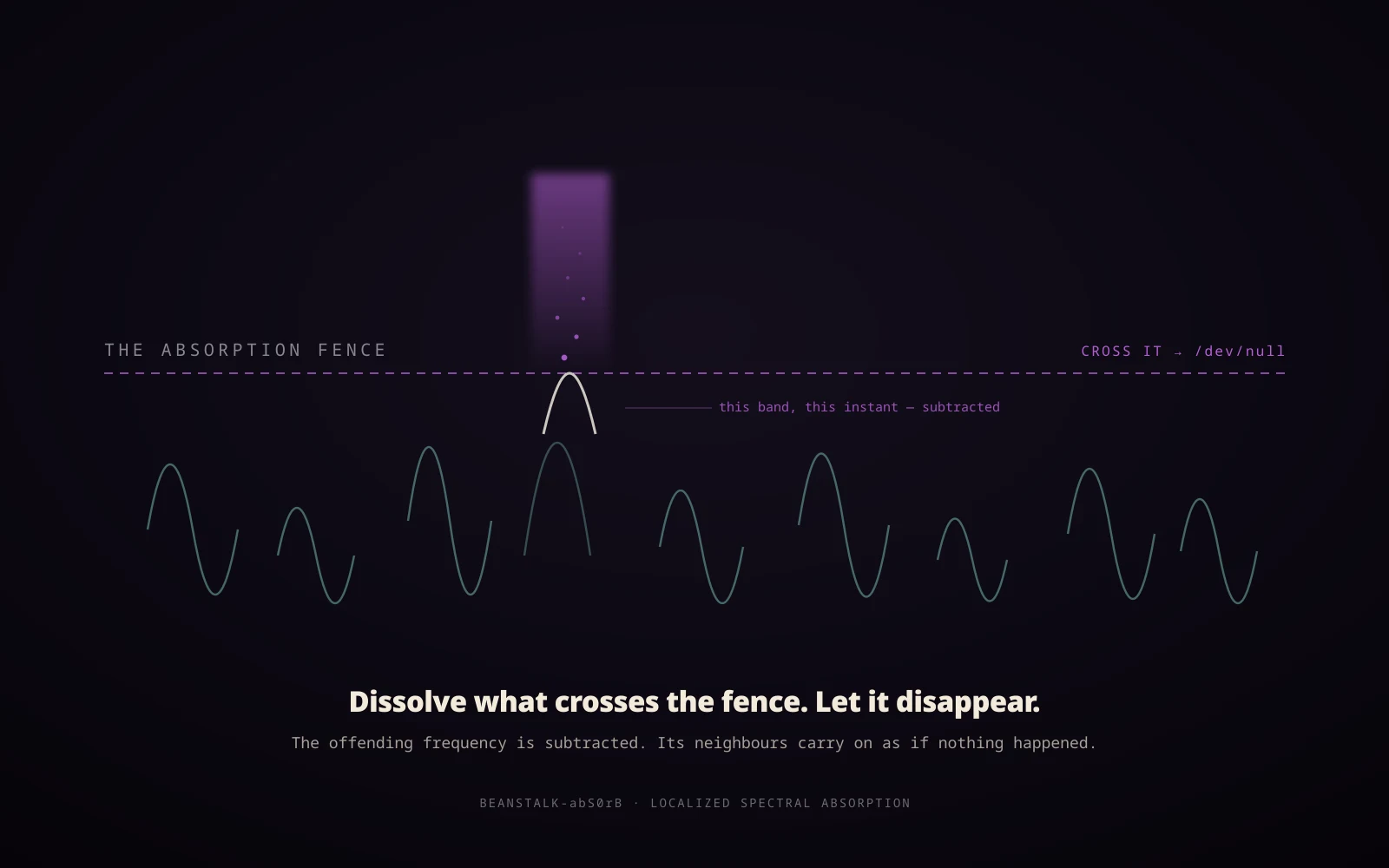
Diagram: a field of narrow spectral events sits below a dashed 'absorption fence'. One event's tip crosses the fence and dissolves upward into particles, labelled 'this band, this instant — subtracted'. The others are untouched.
One band, one instant, subtracted. Its neighbours carry on as if nothing happened.

Honest limit, and it's in the manual: on dense overs — a whole mix slamming at once, with no single responsible frequency — there is nothing narrow to absorb, and abS0rB will not hold your ceiling on its own. That's what the safety stage at −0.1 dBFS behind it is for. abS0rB is built for the sparse, pointed problem: a few peaks are wrong, everything else is right.

Follow the signal (the nerdy bit)
Signal Flow

Where the energy goes.

The signal is decomposed into the band bank, and the absorber subtracts the offending band — on a fence you can tilt — with up to 2 ms of lookahead and a ramped attack. Blend mixes the result against the true, time-aligned dry. Then the safety stage at −0.1 dBFS, the ultrasonic guard, and finally Trim. A hidden layer can still add the old re-ordered dry texture (Dry Blend, Relation) before Blend; it's off by default.
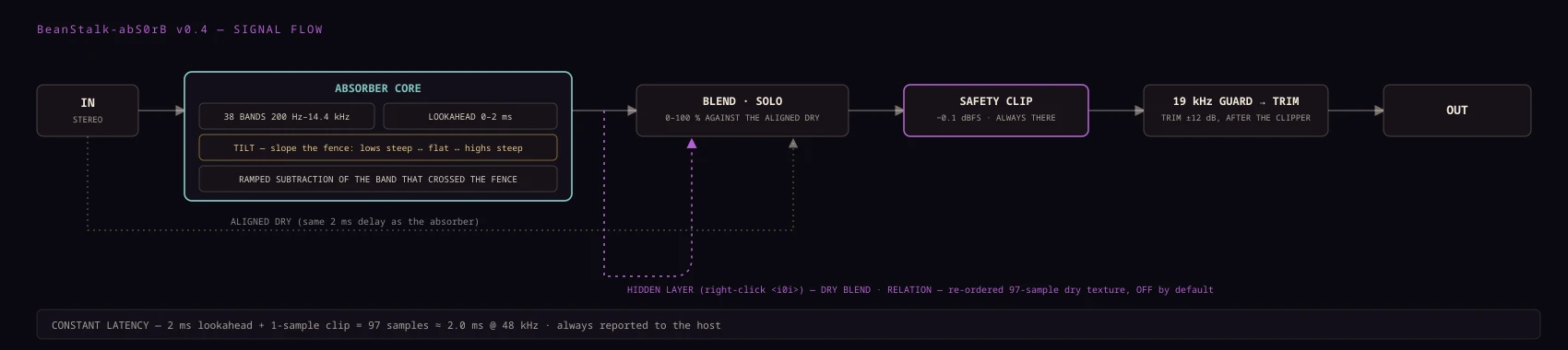
abS0rB v0.4 signal flow: stereo input into the Absorber Core (38 bands from 200 Hz to 14.4 kHz, 0 to 2 ms lookahead, Tilt sloping the fence, ramped subtraction of the band that crossed), into Blend and Solo against the aligned dry, into a safety clip at -0.1 dBFS, a 19 kHz guard and Trim, to output. A dashed hidden-layer branch (Dry Blend, Relation) adds a re-ordered 97-sample dry texture, off by default. Constant latency 97 samples, about 2 ms at 48 kHz, always reported to the host.
The Band Bank38 one-sixth-octave bandpass filters span 200 Hz to about 14 kHz. Each band gets its own envelope follower, so the absorber always knows which band a peak belongs to.
Lookahead0–2 ms. The correction ramps in across the lookahead and reaches full depth on the offending sample; less lookahead means a lighter touch. Latency stays constant whatever you set.
TiltSlopes the fence across frequency, up to 12 dB end to end. Left: the lows are absorbed sooner, the highs left more alone. Right: the reverse. Centre: the classic flat fence. The fence never rises above your Ceiling.
Safety, then TrimA micr0.pkZ safety stage fixed at −0.1 dBFS (a lookahead peak limiter that also checks between the samples; defeatable, on by default), a fixed 19 kHz 4-pole guard that is always on, then Trim — after the safety stage, so boosting Trim can go past −0.1 dBFS.
Controls

Four on the face. Three in the drawer. Two hidden.

Ceiling−20 to −0.1 dBThe fence. Nothing below it is touched. Lower it and more of your signal becomes eligible for absorption; at the top of its range abS0rB does almost nothing.
Lookahead0 to 2 msHow far ahead abS0rB looks before deciding. More lookahead means cleaner, deeper absorption of fast peaks. The knob favours the fine end where the sound changes fastest.
Tiltlows steep ↔ flat ↔ highs steepSlopes the fence across the spectrum, up to 12 dB end to end. Turn left to catch the lows sooner, right to catch the highs sooner. Double-click for flat.
Blend0 to 100%A plain dry/wet against the true, time-aligned dry signal. 100% is the full effect.
Trim±12 dB — drawerOutput gain, after the safety stage. Use it to level-match; positive Trim can take the output past −0.1 dBFS.
Safetyon by default — drawerThe micr0.pkZ safety stage, fixed at −0.1 dBFS whatever the Ceiling says. Off, to hear the absorber raw. Either way the 19 kHz guard stays on and latency doesn't change; switching crossfades over 128 samples, so there is no click.
SolodrawerMonitor only what abS0rB is changing. A listening tool for setting the ceiling by ear — solo it, dial the ceiling until you hear only the offending peaks.
Relation · Dry Blendhidden — right-click <i0i>The re-ordered-dry texture from earlier versions: Dry Blend (0–10%) mixes in a looped, re-ordered slice of the dry; Relation sets how the result relates to it (WET ↔ BYPASS ↔ INV). Both off by default.

The bean-sprout mark (top-left) toggles the readouts. Click the <i0i> mark in the footer for the drawer (Trim, Safety, Solo); right-click it for the hidden layer.

A closer look at the controls
The Interface

Small window. One decision at a time.

A compact, near-black panel in the BeanStalk family style. Ceiling in orchid on the left, then Lookahead in teal, Tilt in gold and Blend in violet. The bean-sprout mark at top-left toggles the numeric readouts; the power light at top-right is host bypass.
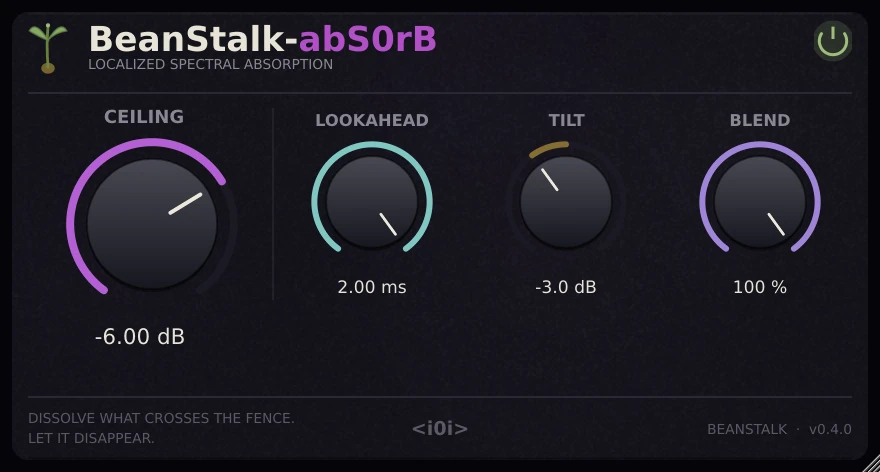
The BeanStalk-abS0rB v0.4 interface: a compact dark panel with a bean-sprout icon, the title BeanStalk-abS0rB and the subtitle Localized Spectral Absorption, and a power light at top-right. A large orchid Ceiling knob on the left, then Lookahead (teal), Tilt (gold, bipolar) and Blend (violet) knobs with their values shown. The footer reads Dissolve what crosses the fence. Let it disappear., a centred <i0i> mark, and BeanStalk v0.4.0.
Default view. Resizable and aspect-locked; part of the BeanStalk family visual system, with orchid as abS0rB's identity hue.
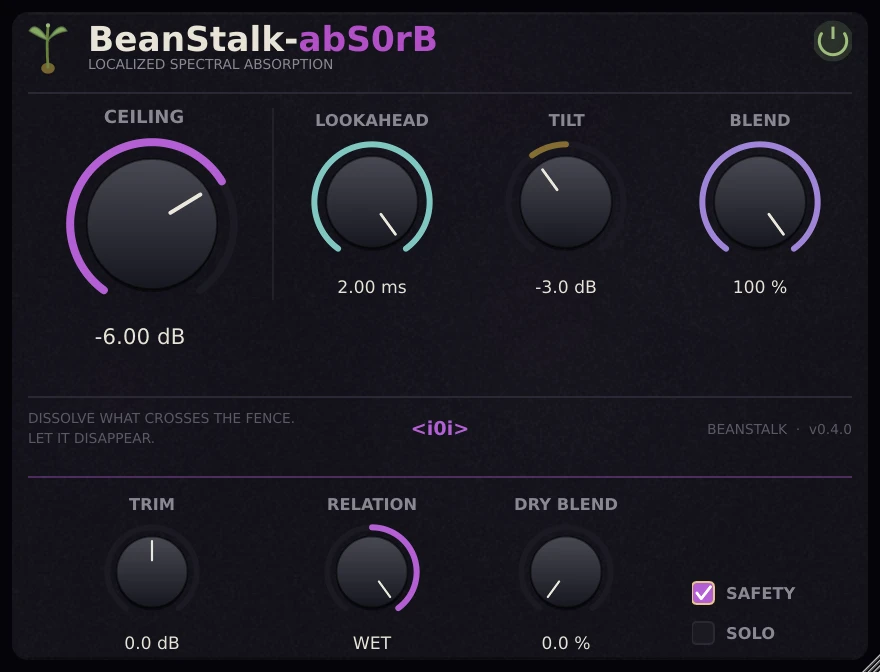
The abS0rB v0.4 interface with the drawer open below the footer: a Trim knob, the hidden-layer Relation and Dry Blend knobs, and Safety and Solo checkboxes at the bottom right.
Click the <i0i> mark and the window grows downward into the drawer — Trim, Safety, Solo. Right-click it and Relation and Dry Blend join the same row.
How to use it

Where it earns its place.

Harsh cymbals & hatsA ride or hat with two or three spikes that stab through the mix. Solo the removed signal, set the ceiling to catch just those stabs, un-solo. The cymbal keeps its body and sizzle; the stabs are gone.
De-essing without the lispBecause abS0rB only touches the band that crossed, a sibilant "ss" comes down without dragging the whole top of the vocal with it. No pumping shelf, no dulled consonants.
Taming a bright synth or guitarOne resonant note that always jumps out — a string ring, a filter squeal. abS0rB flattens that note's peaks and leaves the rest of the performance at full brightness.
Bus & master peak controlOn a mix that's mostly well-behaved but has occasional pointed transient overs, abS0rB shaves those without the whole master ducking. The built-in safety stage at −0.1 dBFS catches whatever is left.
Tilting the fenceOn a bass-heavy bus, tilt left so the low end is absorbed first and the top is left alone; on a bright mix, tilt right to go after the highs. Centre is the classic flat fence.
Hearing your own mixRun abS0rB in Solo on a bus just to hear which frequencies are constantly crossing the line. It's a diagnostic as much as a processor.
A few things to know before you download
What it isn't

Read this before you buy.

abS0rB is deliberately narrow in scope, and being honest about that is the point:

Not a brickwall limiterThe absorber alone does not hold your ceiling on dense, broadband overload — the safety stage at −0.1 dBFS does. Trim sits after that clipper.
Not a compressor or saturatorThere's no broadband gain reduction, no makeup, no harmonic colour added on purpose. When abS0rB isn't absorbing, it's essentially not there (aside from latency).
Not zero-latencyA small constant latency, about 2.5 ms at 48 kHz (the lookahead plus the safety stage). Always reported to your host for delay compensation.
Not monoStereo in, stereo out only. Put it on a stereo track or bus.
Technical details and verified specs
Technical

Verified specifications.

FormatsVST3 · Standalone application
Operating systemsWindows 10/11 (64-bit) · Linux (64-bit)
BuildsLegacy (broad CPU support) and v3 (AVX2; includes the Standalone)
ChannelsStereo in / stereo out only
Sample ratesAny host rate; absorption bands scale with the rate
LatencyConstant 119 samples ≈ 2.5 ms at 48 kHz (2 ms lookahead + 23 samples for the safety stage). Reported for PDC.
OversamplingNone. A fixed 19 kHz 4-pole guard limits ultrasonic content at the output.
Host bypassTrue structural bypass via the host (power light).
CPULight — a filter bank and per-band envelopes; no FFT, no oversampling. Scales gently with sample rate.
Version0.4.0

Dissolve what crosses the fence. Let it disappear.

abS0rB is pay-what-you-want with a $15 suggested price. VST3 and Standalone, Windows and Linux — more platforms may follow.

Get abS0rB on Gumroad

DSP Lineage & Attribution: This plugin incorporates adapted DSP components from Airwindows (Chris Johnson, MIT licensed): ClipOnly3. The specific components and applicable notices are documented in the included THIRD_PARTY_NOTICES.md. This does not imply endorsement by or affiliation with Airwindows.

More BeanStalk plugins

See all plugins →