BeanStalk Plugin

0pp0siti0n

A spectral dissolution processor. 0pp0siti0n doesn't cut a band to silence — three phase-aligned fields, HP-A1, a selectable MID candidate and LP-A1, each subtract an aligned copy of themselves from the dry signal, dissolving their region by however much you ask.

Spectral Dissolution

Nothing is cut off. It's opposed.

HP-A1 dissolves the low field, LP-A1 the high field, and an optional MID field a region in between. Each one is time- or phase-aligned to the dry signal before it is subtracted, so the removal is a true cancellation rather than a filtered residue. RELATION then steers the whole result from inverted, through dry, to fully wet.

Get 0pp0siti0n on Gumroad Pay what you want · free · VST3 + Standalone · Windows + Linux
0pp0siti0n
Built byBean.S.talk · BeanStalk Audio
StatusReleased · Windows + Linux — more platforms may follow
What is it?

A field, not a filter.

Most tools that remove a band do it with a cutoff: above or below a frequency, gain drops toward silence. 0pp0siti0n works differently. Each of its fields computes a filtered copy of the signal, lines it up with the dry signal, and subtracts it. Nothing is ever gated; each field's Amount (0–100%) decides how far its region dissolves, and at 0% the field is skipped entirely.

The alignment is the point. A plain filter lags or leads the dry signal, so subtracting it leaves a smeared residue. HP-A1 delays the dry signal by the field's own group delay before subtracting; LP-A1 solves the mirror problem with a cascade of allpasses. Each field's Align control sets how much of that correction is applied — full at 100%, and a looser, blooming edge as you back it off.

The Concept

Opposition, not removal.

The premise behind 0pp0siti0n: a band doesn't have to disappear to be shaped. Subtracting an aligned copy of a region from itself reads differently than gating it — the edge dissolves rather than getting cut. Three MID candidates ship side by side, none forced on you: A — Edges (built from two HP-A1-style fields), B — Bounded (a delay-aligned upper edge paired with an allpass-aligned lower edge) and C — Crossing (crossed edges that reinforce the region between them).

REDEEM/rEd3mptI0n and the TAP3 discard-field experiment are separate, frozen DSP explorations that are not wired into this plugin at all.

Signal Path

Three aligned fields, then RELATION.

The input runs through LP-A1, the MID candidate and HP-A1 in series; each stage subtracts its own aligned field. RELATION blends the processed result against latency-aligned dry, SOLO can replace it with just the difference, and Trim sets the output level.

IN LP-A1 allpass-aligned MID Off / A / B / C HP-A1 delay-aligned RELATION INV · DRY · WET SOLO = difference TRIM ±24dB OUT DOTTED — latency-aligned dry, blended back in by RELATION; nothing is gated to silence
LP-A1Dissolves above LP Range. Its field is aligned with an inverse-frequency allpass cascade; more sections track closer at the cost of some low-frequency phase dispersion ("bass lag", shown in the readout).
MIDOptional. Off by default; choose candidate A, B or C in the Advanced panel, then set its two edges and Amount on the front panel.
HP-A1Dissolves below HP Range. The dry signal is delayed by the field's own group delay before subtracting, so the cancellation lines up.
RELATION−100 (inverted) through 0 (dry) to +100 (fully wet), against latency-aligned dry. Double-click returns to DRY.
SOLOOverrides RELATION and outputs only what the fields removed or changed.
LatencyFixed ~92ms at 48kHz, reported to your host so it compensates automatically. Bypass returns latency-aligned dry.
Controls

Eight on the panel. The rest behind the badge.

HP Range10Hz–20kHz, default 120HzCorner of the HP-A1 field — how high up the spectrum the low-end dissolve reaches.
HP Amount0–100%, default 0%How far the low field dissolves. At 0% the stage is skipped.
MID Low · MID High100Hz–16kHz, default 400Hz / 3kHzThe MID region's two edges. They may cross; with candidates A and C, crossing reinforces the enclosed region. Ghosted until a MID candidate is chosen.
MID Amount0–100%, default 0%How far the MID region dissolves.
LP Range20Hz–20kHz, default 4kHzCorner of the LP-A1 field — where the high-end dissolve begins.
LP Amount0–100%, default 0%How far the high field dissolves. At 0% the stage is faded out.
RELATION−100 INV … 0 DRY … +100 WET, default +100Blends the processed result against latency-aligned dry. Double-click returns to DRY.
HP Order · LP OrderAdvanced panel, 2/4/6/8-pole, default 8 / 4Mostly moves where each edge sits; the HP slope stays around 18dB/octave at every order.
HP · LP · MID AlignAdvanced panel, 0–100%, default 100%How much alignment each field gets. 100% is full correction; lower values give a looser edge.
MID candidateAdvanced panel, Off / A / B / CEdges, Bounded or Crossing — all three ship as finished options.
TrimAdvanced panel, −24 to +24dB, default 0dBOutput gain, applied after everything.
SOLOAdvanced panelHear only what the fields removed or changed.
The bean-sprout marktop-leftClick to reveal every numeric value readout at once. Dormant by default — plain bean, no numbers.
The <i0i> markfooter, dead centreOpens the Advanced band — orders, Align, MID candidate, Trim, SOLO and the latency/alignment readout — by growing the same window.
BYPASSheader power lightReturns latency-aligned dry.
The Interface

Ash violet. Part of the BeanStalk family.

0pp0siti0n uses the shared BeanStalk vector panel with a Cosmic Dark cast and a muted, ash-violet identity — dissolving and eroding rather than saturated, matching a plugin about subtraction rather than addition. The front panel follows the spectrum left to right: HP, MID, LP, then RELATION, above a field strip that shows where each region dissolves. The window resizes freely with a locked aspect, everything scaling together, and remembers its size. Everything is drawn with vector primitives — no baked knob art, no skin images.
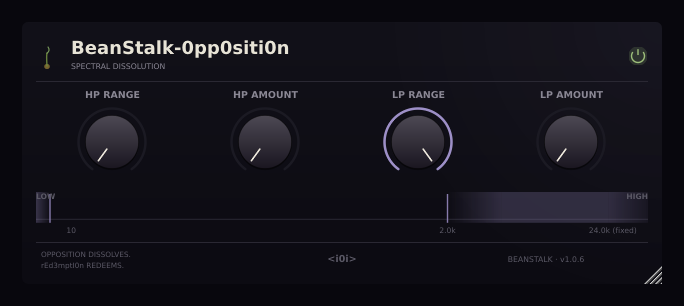
The BeanStalk-0pp0siti0n front panel: a near-black bar. Top-left a small bean mark; the title 'BeanStalk-0pp0siti0n' with the subtitle 'SPECTRAL DISSOLUTION'. Top-right a small power light. Left to right: HP Range and HP Amount knobs, then ghosted MID Low, MID High and MID Amount knobs, then LP Range and LP Amount, then a larger RELATION knob marked INV and WET. Below, a horizontal dissolution-field strip from LOW to HIGH with HP and LP markers. Footer: 'OPPOSITION DISSOLVES. rEd3mptI0n REDEEMS.', a centred '<i0i>' mark, and the version.
The front panel — HP, MID (ghosted until a candidate is chosen), LP and RELATION. Values hidden until the bean is clicked.
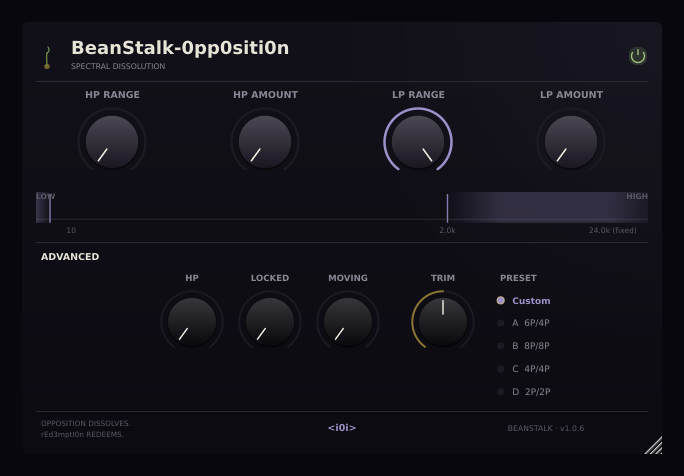
The BeanStalk-0pp0siti0n Advanced band, opened below the same front panel by growing the window taller. Headed 'ADVANCED': HP Order, HP Align and MID Align knobs, a MID list showing Off, A Edges, B Bounded and C Crossing, then LP Order, LP Align and Trim knobs. To the right, an ALIGNMENT readout with Latency, HP Aligned and LP Bass Lag, and a SOLO checkbox.
The Advanced band — orders, Align, MID candidate, Trim, SOLO and a live alignment readout. Same window, just taller.
How to use it

Where it earns its place.

Low-end dissolveSet HP Range where the low end should start to recede and raise HP Amount — the bottom thins out without a rumble filter's hard edge.
High-end dissolveBring LP Range down and LP Amount up for a receding top end instead of an abrupt lowpass cutoff.
Carve a middle regionPick a MID candidate in the Advanced panel, set MID Low and MID High around the region, and dial in MID Amount.
Looser edgesBack an Align control off from 100% for a softer, blooming edge instead of a clean cancellation.
Hear what's being takenTurn on SOLO to hear only what the fields removed or changed.
A/B against the sourceDouble-click RELATION to DRY, or use the header power light — both return latency-aligned dry, so the comparison is level and time matched.
What it isn't

Read this before you download.

Not a standard EQ0pp0siti0n doesn't apply a cutoff curve — it subtracts aligned copies of each region from dry, each controlled by its own Amount.
Not zero-latencyReal alignment costs a fixed ~92ms at 48kHz. It is reported to your host, which compensates automatically, but it is not suited to live monitoring. Reducing it is a known future item.
No REDEEM or harmonic return pathrEd3mptI0n and the TAP3 discard-field experiment are separate, frozen DSP work — nothing that dissolves in 0pp0siti0n comes back as harmonics.
Not CPU-freeThe fractional delay behind the alignment is the plugin's main cost, around 1% of a core at 48kHz.
Technical

Verified specifications.

FormatsVST3 · Standalone application
Operating systemsWindows 10/11 (64-bit) · Linux (64-bit)
ChainLP-A1 → MID (Off / A / B / C) → HP-A1 → RELATION / SOLO → Trim
HP Range10Hz–20kHz (log-scaled), default 120Hz
LP Range20Hz–20kHz (log-scaled), default 4kHz
MID edges100Hz–16kHz each (log-scaled), default 400Hz / 3kHz
Filter orders2/4/6/8-pole for HP and LP; LP allpass sections follow automatically (2/2/4/8)
RELATION(1 − |b|) · aligned dry + b · wet, b from −1 to +1
LatencyFixed, 4413 samples at 48kHz (~92ms), reported to the host
Trim±24dB output gain, default 0dB
BypassHeader power light, real host-automatable parameter; returns latency-aligned dry
AutomationEvery control, including Bypass, SOLO and the MID candidate, is host-automatable

Nothing is cut off. It's opposed.

0pp0siti0n is pay-what-you-want, and free is a fair price. VST3 and Standalone, Windows and Linux — more platforms may follow.

Get 0pp0siti0n on Gumroad

DSP Lineage & Attribution: This plugin incorporates adapted DSP components from Airwindows (Chris Johnson, MIT licensed): Pafnuty2. The specific components and applicable notices are documented in the included THIRD_PARTY_NOTICES.md. This does not imply endorsement by or affiliation with Airwindows.

More BeanStalk plugins

See all plugins →