BeanBuS
Put a whole plugin chain inside one plugin slot. Load your effects, change their order, and bypass what you don't need.
Your plugin rack, in one slot.
BeanBuS hosts other plugins in a straight chain. Each one feeds the next, just like an ordinary DAW insert chain. BeanBuS itself isn't adding a sound.
Get BeanBuS on Gumroad $20 · VST3 + Standalone · Windows + LinuxSo, what does it do?
Want several plugins in one slot? BeanBuS lets you load them, change their order, and switch them on or off. It doesn't add its own sound.
A straight chain. The order is the routing.
Audio goes in, through each hosted plugin in turn (each with its own bypass), and out. A master bypass takes the whole rack out of the path. In the Standalone, the tape deck listens to the signal after the rack.
Everything you do to a chain, without leaving it.
solo (as some BeanStalk plugins do), a SOLO toggle appears on its module. Otherwise there is none.A closer look at the controls
Slate-blue and dark. Part of the BeanStalk family.
One narrow column: header, the rack, a status hint, and the footer. The window is 440 units wide and stretches vertically to fit as many modules as you like.
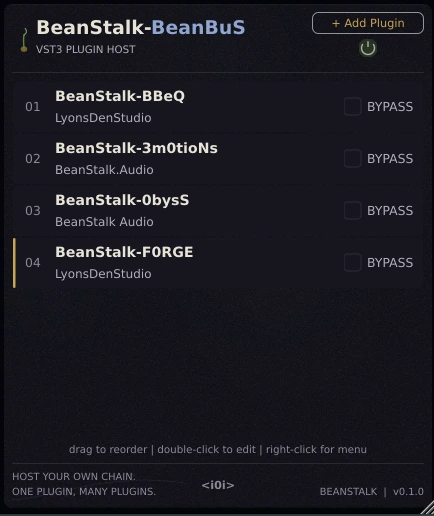
Record what comes out of the rack.
In the Standalone build, click the <i0i> mark in the footer to open the tape deck in its own window. It records the signal after the rack to WAV or FLAC, at 16 or 24 bit, at the sample rate your audio device is running. It has two VU meters (0 VU can be set to −18, −20 or −14 dBFS), a true-peak strip with an OVER latch at −1.0 dBTP, peak-hold and RMS readouts. Record, play and stop are on the deck; the window is aspect-locked and scales as one piece.
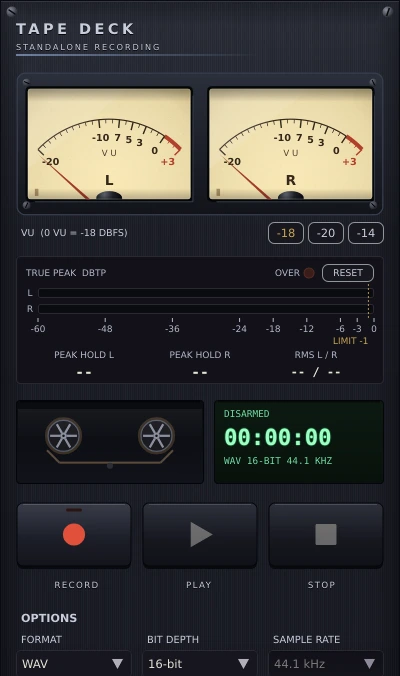
The deck records the rack's output, not another application. To feed audio in from another app, see “Routing audio in” below.
The Standalone opens one audio device.
The Standalone has no built-in way to pull audio from another running app, so to process another app's output you route it there at the operating-system level. On Linux, PipeWire/JACK graphs are patchable directly — connect the source's ports to BeanBuS's inputs with qpwgraph, Helvum or Carla's patchbay. On Windows, use a virtual audio cable (for example the free VB-CABLE, installed separately) and pick it as BeanBuS's input device. The download includes a small helper script and a README section that walk through it. As a VST3 inside a DAW, none of this is needed.
Where it earns its place.
A few things to know before you download
Read this before you download.
Technical details and verified specs
Verified specifications.
Host your own chain.
One plugin, many plugins — a rack that saves with your session. VST3 and Standalone, Windows and Linux — more platforms may follow.
Get BeanBuS on Gumroad