BeanStalk Plugin

mIm0ny0

Trim a stereo pair, explore a signal built from its differences, and listen through a set of monitoring views—all in one small tool.

Trim · Phantom · Monitor

A workbench for two channels.

Start with level trims for left, right, mid, and side. Then explore the phantom signal and the monitoring modes to hear how the channels relate.

Get mIm0ny0 on Gumroad Pay what you want · free · VST3 + Standalone · Windows + Linux
mIm0ny0
Built byBean.S.talk · BeanStalk Audio
Statusv0.1.0 · Windows + Linux — more platforms may follow
What is it?

So, what does it do?

A little workbench for stereo sound. Trim the channels, listen to the differences between them, and switch between monitoring views to hear what's going on.

The phantom

Half of one channel. Half of the other.

Each channel is split into its positive half and its negative half. L+ R− is the left channel's positive half plus the right channel's negative half. L− R+ is the reverse. The single result plays from both speakers. Neither is an ordinary sum or difference, and the two sound different — which is the point. Click the lit one again to turn Phantom off.
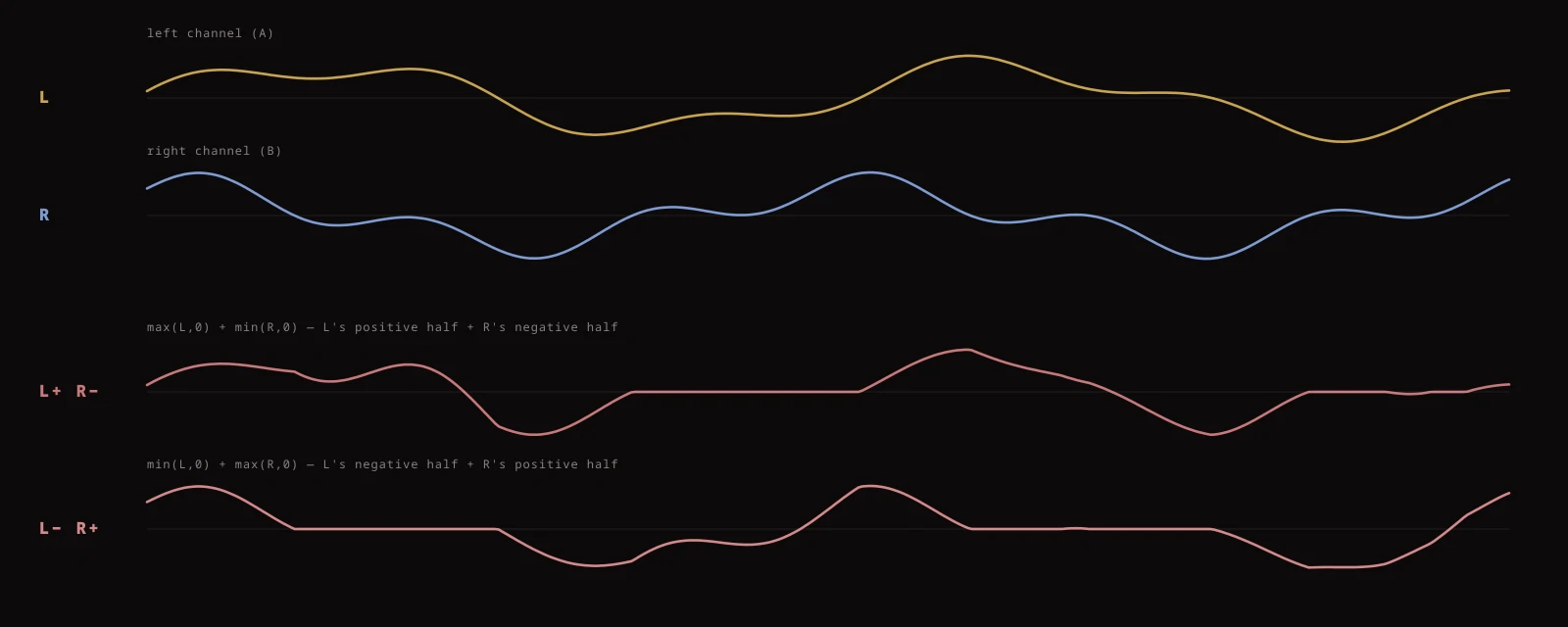
Four stacked waveforms on a dark background: the left channel in gold, the right channel in blue, and below them the two phantoms in rose — L+ R− and L− R+ — each made from one positive half and one negative half.
Illustrative schematic — not a measurement. Two made-up waveforms, run through the exact phantom formulas.

With a mono signal (L = R), both phantoms simply reproduce the signal — the two halves add back up to the original. The phantom only becomes something new where L and R differ.

Signal flow

Trim, then phantom, then monitor.

Phantom and Monitor are independent and can run together. Bypass is the power light in the header.

Signal flow: stereo in, then TRIM (left, right, mid, side, master), then PHANTOM (off, L+ R−, L− R+; dual-mono), then MONITOR (off, subs, slew, peaks, side, mono, aurat, phone, monoL, monoR), then out. STEREO INLR TRIMLEFT ±12 dBRIGHT ±12 dBMID ±12 dBSIDE ±12 dBMASTER ±12 dB PHANTOMOFFL+ R− (L+ half + R− half)L− R+ (L− half + R+ half)output: dual-mono MONITOROFF SUBS SLEW PEAKSSIDE MONO AURAT PHONEMONOL MONOR OUT Phantom and Monitor are independent and can run together. Bypass is the power light.
Trim is unity at 0 dBWith every trim at zero the signal passes through unchanged.
Phantom is dual-monoThe phantom is one signal, sent to both channels.
Monitors alter the soundThey are listening tools. Set MONITOR to OFF before you bounce.
Zero latencyEvery stage works sample by sample — no lookahead, no delay lines.
Controls

Five trims. Two phantoms. Ten monitor positions.

LEFT · RIGHT · MID · SIDE±12 dB each, default 0Gain on each channel (LEFT, RIGHT) and, independently, on the sum and the difference of the two (MID, SIDE).
MASTER±12 dB, default 0Overall gain after the trim stage.
PHANTOMOFF · L+ R− · L− R+The positive half of one channel plus the negative half of the other, on both speakers. Click the lit one again for off.
SUBSmonitorKeeps only the low end, through a cascade of 26 one-pole low-passes.
SLEWmonitorShows how fast the signal is changing — its rate of change, clipped.
PEAKSmonitorA peak-emphasis view: four allpass stages with arcsine shaping.
SIDE · MONOmonitorOnly the side (L−R), or only the mono sum (L+R), on both speakers.
AURAT · PHONEmonitorSmall-speaker band-pass checks — a wide midrange band, and a narrower, higher one in mono.
MONOL · MONORmonitorThe left (or right) channel alone, sent to both speakers, unfiltered.
The bean-sprout marktop-leftClick to reveal every numeric readout. Dormant by default.
The <i0i> markfooter, dead centreClick to open the Monitor drawer. Right-click to open Phantom beside it.
BYPASSheader power lightGreen while on, dim grey when bypassed. Bit-exact pass-through once settled.
A closer look at the controls
The Interface

Rose and dark. Part of the BeanStalk family.

The panel opens compact, with the values hidden. The whole thing scales as one — every label, knob and toggle grows and shrinks together — so it looks the same at any size.
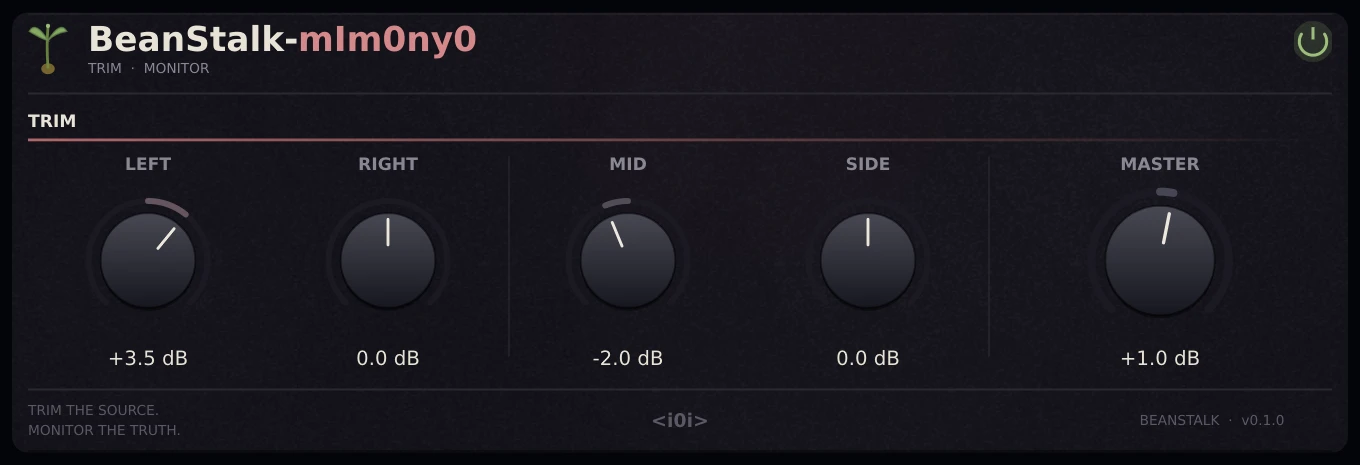
The BeanStalk-mIm0ny0 front panel: a dark bar with the title 'BeanStalk-mIm0ny0' (mIm0ny0 in rose), the subtitle 'TRIM · MONITOR', a bean-sprout mark at top-left and a green power light at top-right. A TRIM section with five knobs — LEFT, RIGHT, MID, SIDE and, larger, MASTER — each with a dB readout, and a footer with the <i0i> mark at the centre.
The front panel with the readouts shown (a render of the plugin's own editor; demo settings).
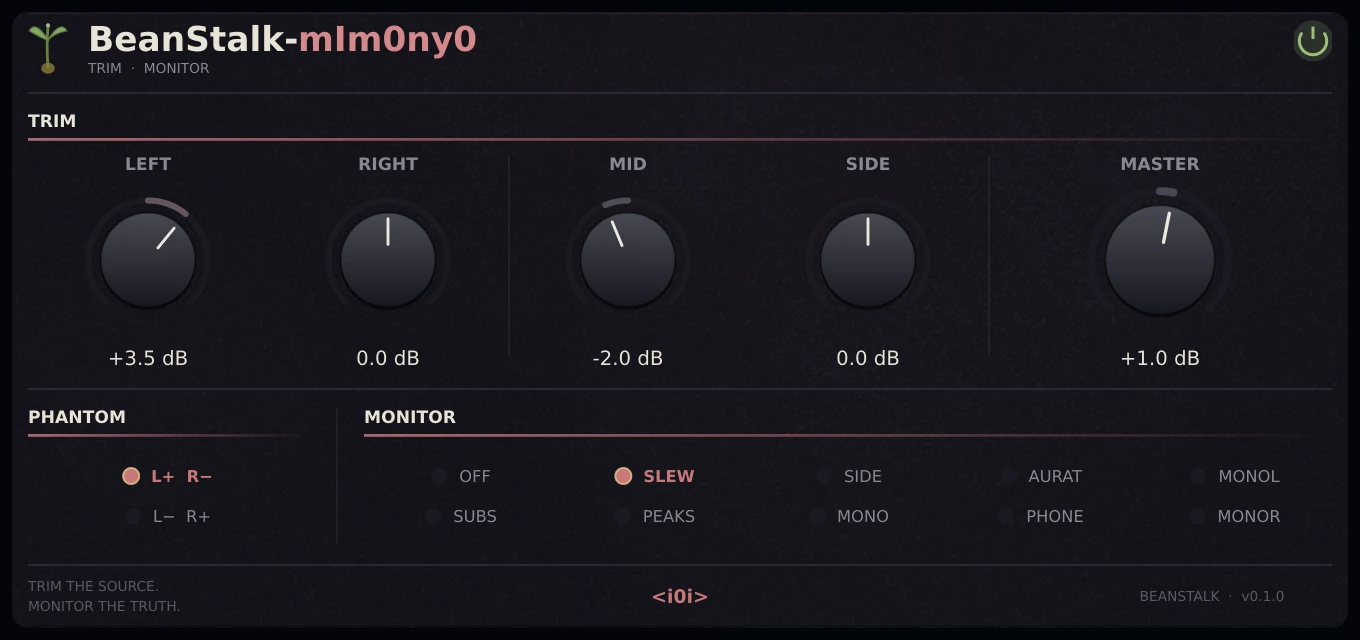
The same panel with the drawer open below the knobs: a PHANTOM section on the left with L+ R− lit and L− R+ below it, and a MONITOR section on the right with two rows — OFF/SUBS, SLEW (lit)/PEAKS, SIDE/MONO, AURAT/PHONE, MONOL/MONOR.
The drawer — Phantom and Monitor. Same window, just taller.
How to use it

Where it earns its place.

Check one channelMONOL or MONOR plays just that channel on both speakers — a quick check for a dead side, a stray phase problem, or what a hard-panned part is doing.
See what's under the topSUBS keeps only the low end; SLEW shows the fast edges. Two views of the same signal that a full-range listen hides.
Small-speaker checkAURAT and PHONE give a midrange-only view, to judge a balance the way a small speaker or a phone would present it.
Hear the halvesSet PHANTOM to L+ R−, then to L− R+. What survives is a different signal each way — try it on a stereo mic pair or a stereo bus.
Phantom, then monitorTurn on a phantom and put SLEW or SUBS behind it: the monitor listens to the phantom, not the original.
Balance before you judgeUse LEFT/RIGHT and MID/SIDE to even out a pair, then monitor the corrected signal.
A few things to know before you download
What it isn't

Read this before you download.

Monitors change the soundSUBS, SLEW, PEAKS, SIDE, MONO, AURAT, PHONE, MONOL and MONOR are listening tools. Set MONITOR to OFF, or bypass, before you render.
Not a mastering utilityIt is a small trim and monitor bench. It has no metering, limiting or loudness tools.
SLEW depends on sample rateIts level differs between sample rates — an inherited trait of the original design. Set it by ear at your session rate.
No output limiterTrim can add up to +12 dB to each control. Loud material can still overload the bus.
Phantom is not a widenerIt builds one new signal from the halves of L and R and plays it on both speakers. It does not widen or correct a stereo image.
Early releasev0.1.0. It has been validated against the originals, tested for safety, and run in Ardour and as a standalone plugin host — but not yet in every host.
Technical details and verified specs
Technical

Verified specifications.

FormatsVST3 · Standalone application
Operating systemsWindows (64-bit) · Linux (64-bit)
ChannelsStereo in, stereo out
Latency0 samples
ProcessingDouble precision inside the plugin
Sample ratesOutput verified finite and stable at 44.1 / 48 / 88.2 / 96 / 176.4 / 192 kHz
Against the originalsTrim and seven monitor modes match Airwindows EveryTrim and Monitoring3 sample-for-sample; the original's final 24-bit quantiser is deliberately left out
BypassBit-exact pass-through once the 10 ms crossfade settles
AutomationAll five trims, Phantom, Monitor and bypass are host-automatable
BuildsTwo tiers per platform: a legacy VST3 for any 64-bit CPU, and a VST3 + Standalone build for CPUs with AVX2
Version0.1.0

DSP lineage: TRIM and the SUBS, SLEW, PEAKS, SIDE, MONO, AURAT and PHONE monitor modes are adapted from Airwindows EveryTrim and Monitoring3 (Chris Johnson, MIT licensed). PHANTOM, MONOL and MONOR are original to BeanStalk. This does not imply endorsement by or affiliation with Airwindows.

Trim the pair. Split it into halves. Then monitor it.

mIm0ny0 is pay-what-you-want, and free is a fair price. A trim, a phantom and a monitor bench — VST3 and Standalone, Windows and Linux — more platforms may follow.

Get mIm0ny0 on Gumroad

More BeanStalk plugins

See all plugins →