BeanStalk Plugin

StaIr-y0

Two stereo channels go in. A new, phantom signal comes out of their differences. Decide what it sounds like and where it sits.

Phantom Polarity Lab

Hear what's between left and right.

StaIr-y0 compares the positive and negative parts of your two channels and builds another voice from their relationship. You control its level, position, and width.

Get StaIr-y0 on Gumroad Pay what you want · free · VST3 + Standalone · Windows + Linux
StaIr-y0
Built byBean.S.talk · BeanStalk Audio
StatusReleased · v0.2.0 · Windows + Linux — more platforms may follow
What is it?

So, what does it do?

StaIr-y0 listens to the differences between left and right and turns them into another signal. Solo it, shape it, and decide how much you want to hear.

Curious how it works?
The concept

The phantom is what A and B disagree about.

Each channel is split into its positive half and its negative half. The phantom is built from how the two channels differ in those halves — DIFFERENCE is simply A − B; MAGNITUDE is |A| − |B|, how much louder one side is regardless of polarity; POSITIVE and NEGATIVE isolate the two halves of the disagreement on their own.
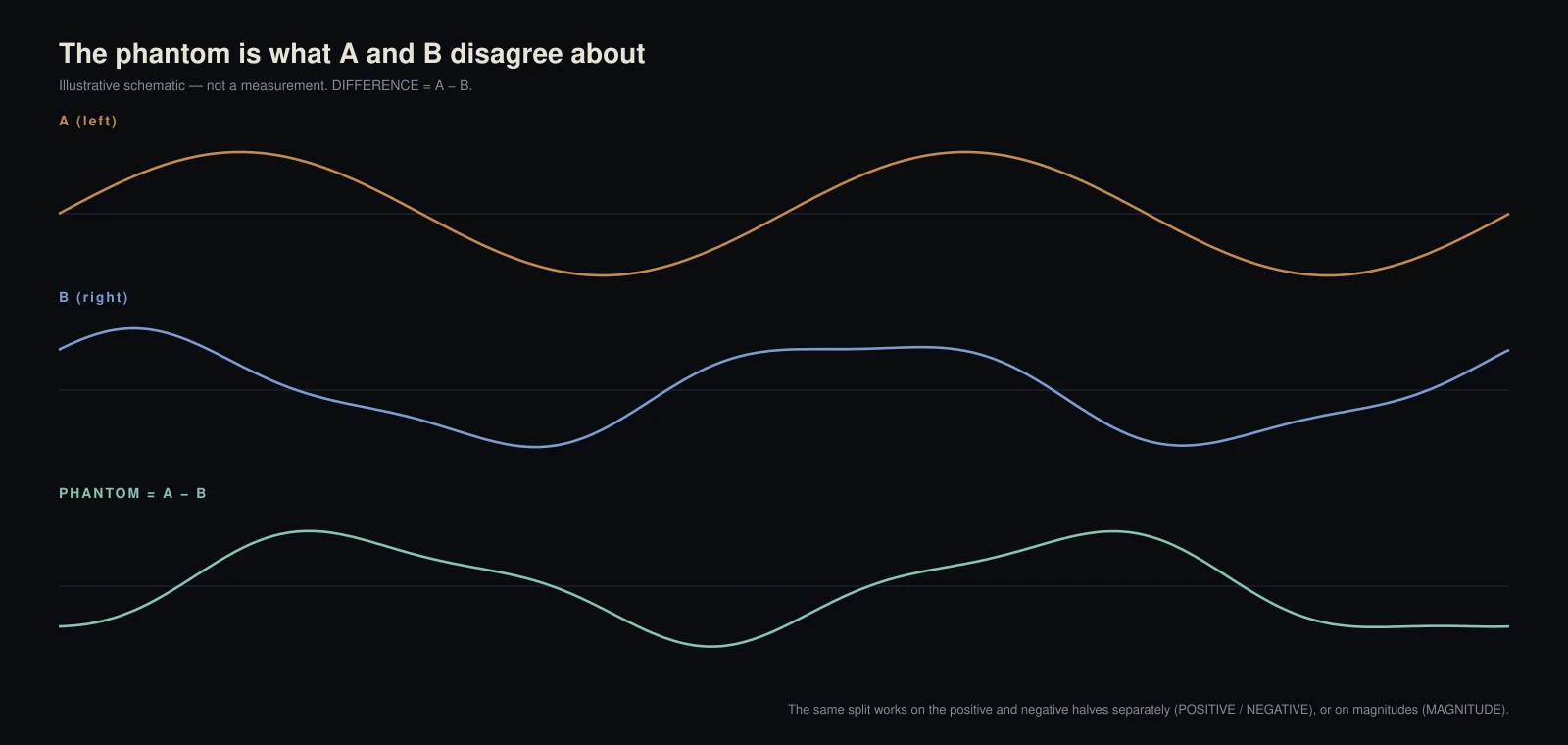
Three stacked waveforms on a dark background: A in amber, B in blue, and below them the phantom in mint, which is A minus B.
Illustrative schematic — not a measurement. The phantom (mint) is A − B.

Mono material gives the phantom nothing to work with: with one channel feeding both A and B, every source above is exactly zero.

Signal flow

A and B go straight through. The phantom is added underneath.

Two identical voices — source, level, pan, width — each fed by the same polarity split. Voice 2 is off by default and adds an OPPOSE stage that flips only its own output. Both voices are summed, scaled by RELATION, and added back to the untouched A and B before the output gain.

Signal flow: L and R (A and B) pass straight to the final sum; both are also split by polarity into Voice 1 and Voice 2 (source, level, pan, width; Voice 2 adds Oppose), summed, scaled by Relation, added back to A and B, then Output gain.L = Ainput leftR = Binput rightA PASSES THROUGH UNTOUCHEDB PASSES THROUGH UNTOUCHEDPolarity split± halvesVOICE 1Source4 modesLevel0 – 50 %Panequal-powerWidthM/S matrixVOICE 2 (OFF BY DEFAULT)Source4 modesLevel0 – 50 %Panequal-powerWidthM/S matrixØOPPOSEΣV1 + V2RELATIONINV ← BYP → WETΣOUTPUT−24 … +12 dBSOLO PHANTOM mutes the dashed A/B paths. BYPASS routes input straight to output. No lookahead, no filters, no delay lines — zero latency.Five meters read A, B, the phantom (after both voices), and out L / out R.
A and B are never alteredThe original channels reach the output as they arrived; the phantom is an addition, not a replacement.
Oppose flips only Voice 2The polarity inversion is applied to Voice 2's own generated pair, after pan and width, before it joins Voice 1's.
Relation is after the sum−100 % is the whole phantom polarity-inverted, 0 is silent, +100 % is as generated (the default).
Zero latencyNo lookahead, no filters, no delay lines — every stage is per-sample arithmetic.
Controls

Three per voice. Two global. Everything else behind the badge.

SOURCEDIFFERENCE · MAGNITUDE (POSITIVE · NEGATIVE in Advanced)What the phantom is made of. DIFFERENCE is A − B; MAGNITUDE is |A| − |B|. Each voice chooses its own.
LEVEL0–50 %, Voice 1 default 30 %, Voice 2 default 0 %How much phantom is added. The 50 % ceiling is deliberate. Voice 2 starts at zero so switching it on never changes the sound until you raise it.
PAN−100 … +100 %, default centreEqual-power placement of the phantom in the stereo field.
WIDTH0–100 %, default 50 %An M/S width matrix on the panned phantom. It only has something to work on once PAN is off-centre — at dead centre there is no side content to widen.
VOICE 2 · ONoff by defaultA second, fully independent phantom voice. When off, the whole voice dims and does nothing.
OPPOSEVoice 2 onlyPolarity-inverts Voice 2's own generated pair before it sums with Voice 1's — the two-instance, phase-inverted-bus trick, inside one plugin.
RELATIONINV ← BYP → WET, default WETBipolar scale on the whole summed phantom. INV flips its polarity, BYP (centre) leaves only your original signal, WET is the phantom as generated.
OUTPUT−24 … +12 dB, default 0 dBPlain gain after the sum. There is no limiter.
LEVEL METERSA · B · PH · L · RSegmented meters for input A, input B, the phantom, and the two outputs — pale when quiet, more saturated as the signal rises.
The bean-sprout marktop-leftClick to reveal every numeric readout. Dormant by default.
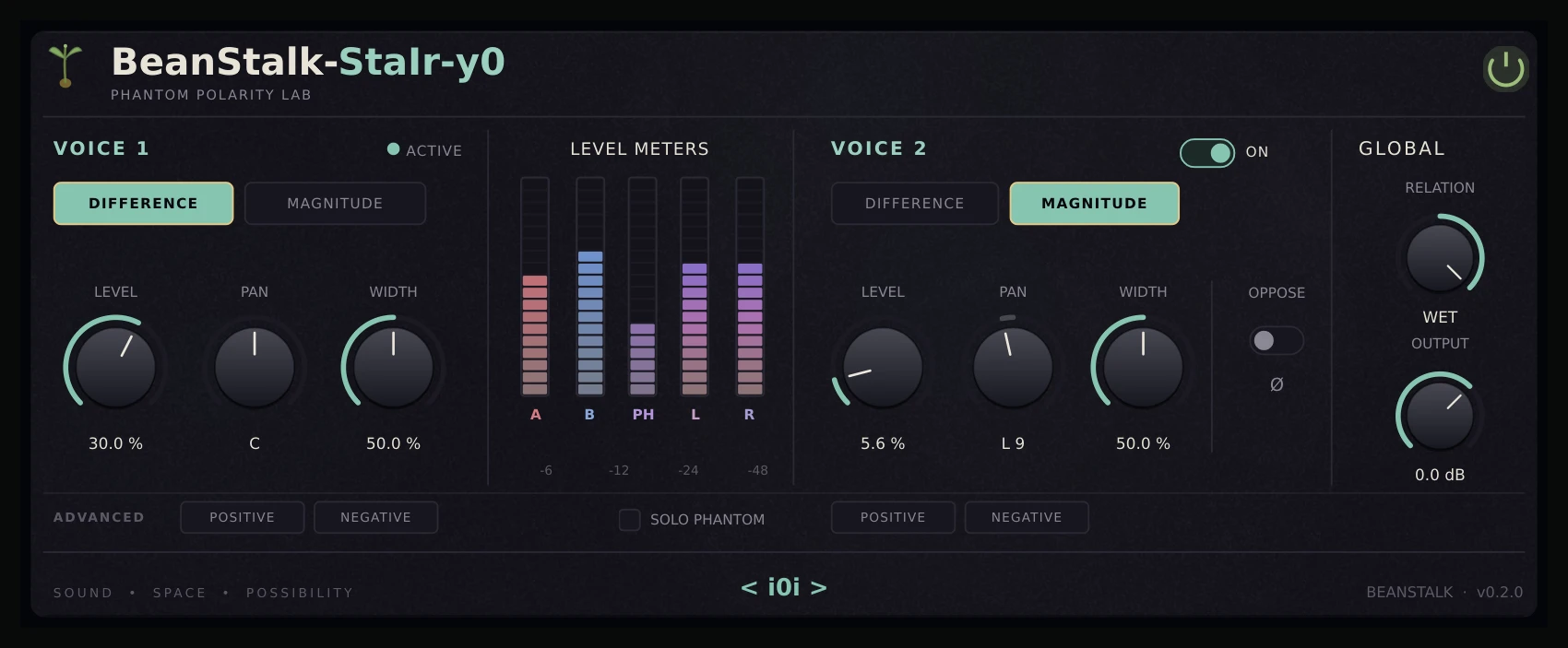
The <i0i> markfooter, dead centreOpens the Advanced band — POSITIVE and NEGATIVE for each voice, and SOLO PHANTOM — by growing the same window.
BYPASSheader power lightGreen while the plugin is on, dim grey when bypassed. True bypass: output is the input, untouched.
A closer look at the controls
The Interface

Ghost-mint and dark. Part of the BeanStalk family.

Four columns: Voice 1, the level meters, Voice 2, and the global controls. The whole panel scales as one — every label, knob and toggle grows and shrinks together — so it looks the same at any size.
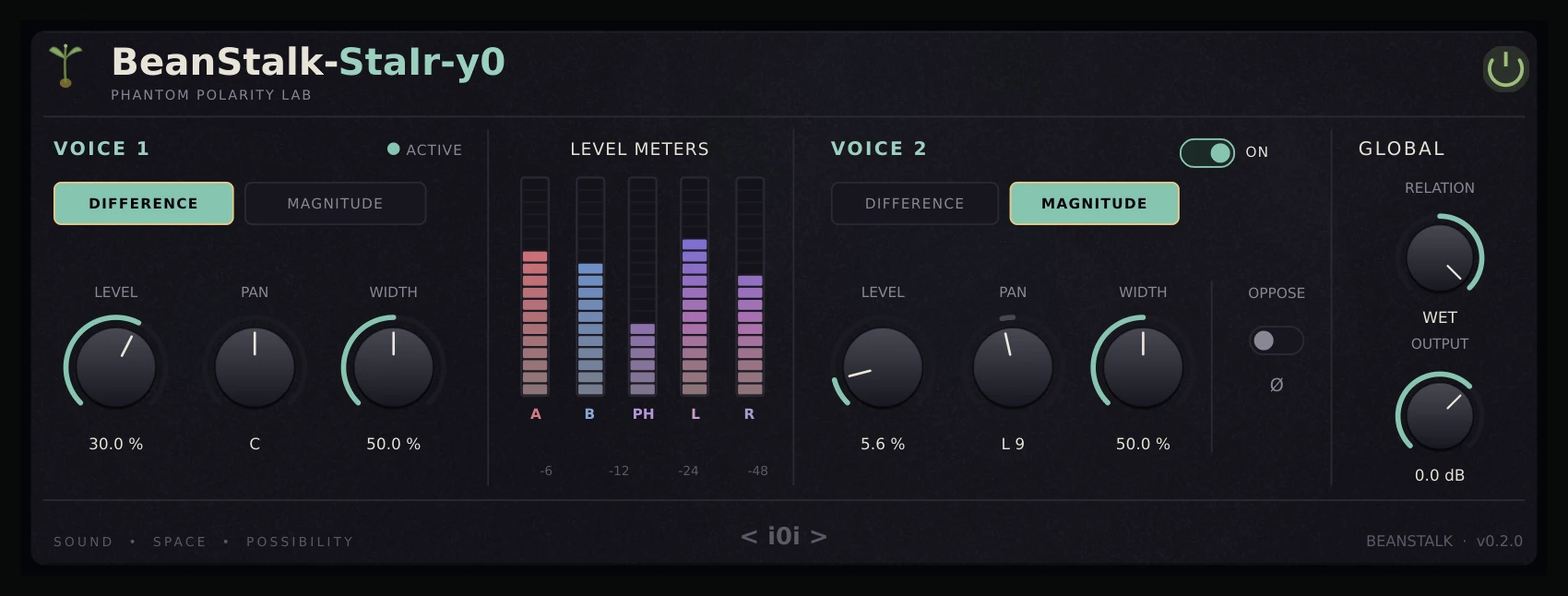
The BeanStalk-StaIr-y0 front panel: a dark bar with the title 'BeanStalk-StaIr-y0' (StaIr-y0 in pale mint) and subtitle 'PHANTOM POLARITY LAB', a bean-sprout mark at top-left and a green power light at top-right. Four columns separated by hairlines: Voice 1 with DIFFERENCE and MAGNITUDE buttons and LEVEL, PAN and WIDTH knobs; five segmented level meters labelled A, B, PH, L and R; Voice 2 with an ON switch, the same buttons and knobs, and an OPPOSE switch; and GLOBAL with RELATION and OUTPUT knobs. Footer: 'SOUND • SPACE • POSSIBILITY', a centred '<i0i>' mark, and the version.
The front panel — Voice 1, level meters, Voice 2 and global controls.
The same StaIr-y0 panel with the Advanced band open below the columns: POSITIVE and NEGATIVE buttons for Voice 1 and for Voice 2, and a SOLO PHANTOM checkbox in the middle.
The Advanced band — POSITIVE and NEGATIVE for each voice, and SOLO PHANTOM. Same window, just taller.
How to use it

Where it earns its place.

Hear the space between two micsPut a stereo pair through it, set DIFFERENCE, and raise LEVEL: the phantom is what the two mics disagree about. Solo it to hear exactly that.
A subtle third layerKeep LEVEL low with RELATION at WET and the phantom sits under the original as a faint, related shadow.
Cancel and contrastTurn RELATION to INV to subtract the phantom instead of adding it — the same material, opposite polarity.
Two phantoms, opposedEnable Voice 2, choose a different source, raise its LEVEL and flip OPPOSE. Two voices built from the same disagreement, set against each other.
Place it apartPan the phantom off-centre and open WIDTH to push it away from the original image.
A/B against the sourceRELATION at BYP, or the power light, gives you your untouched signal for an exact comparison.
A few things to know before you download
What it isn't

Read this before you download.

Not a stereo widenerIt doesn't change how wide A and B are. It adds a new signal derived from their difference.
Not a phase-correction toolThere is no alignment or analysis. If A and B are out of time with each other, the phantom reflects that.
Mono in gives silenceWith one channel feeding both A and B there is no difference, so the phantom is exactly zero.
No output limiterLEVEL is capped at 50 % and OUTPUT can add up to +12 dB — loud material can still overload the bus. Mind your levels.
Width needs PanAt PAN centre the phantom has no side content, so WIDTH has nothing to act on. That is mathematics, not a bug.
An experimental instrumentIt is a lab tool, not a preset machine. What you get depends entirely on the pair you feed it.
Technical details and verified specs
Technical

Verified specifications.

FormatsVST3 · Standalone application
Operating systemsWindows (64-bit) · Linux (64-bit)
ChannelsStereo in, stereo out. A mono input is accepted but yields no phantom.
Latency0 samples — no lookahead, filters or delay lines
Sample ratesIdentical at any rate — stateless per-sample math; validated at 44.1 / 48 / 88.2 / 96 / 176.4 / 192 kHz
BypassTrue bypass — output equals input
AutomationSource, level, pan, width, Voice 2 on/off, Oppose, Relation, output gain, bypass and solo are host-automatable
BuildsTwo tiers per platform: a legacy VST3 for any 64-bit CPU, and a VST3 + Standalone build for CPUs with AVX2
Version0.2.0

The signal that lives between your two channels.

StaIr-y0 is pay-what-you-want, and free is a fair price. An experimental phantom polarity lab — VST3 and Standalone, Windows and Linux — more platforms may follow.

Get StaIr-y0 on Gumroad

More BeanStalk plugins

See all plugins →