BeanStalk Plugin

Shad0wS

Find the notes hiding inside a sound and build new harmonic shadows around them. Go subtle, wide, or downright unruly.

Harmonic Shadow Processor

Follow the note. Shape its shadow.

Shad0wS uses several pitch-tracking paths to follow tonal material. The controls decide how those tracked notes become new harmonic layers and how much you hear.

Get Shad0wS on GumroadPay what you want · free · VST3 + Standalone · Windows + Linux
SHD
Built byBean.S.talk · BeanStalk Audio
StatusReleased · v0.37.0 · Windows + Linux — more platforms may follow
The panel

Four knobs. Four tracker characters. A drawer behind the badge.

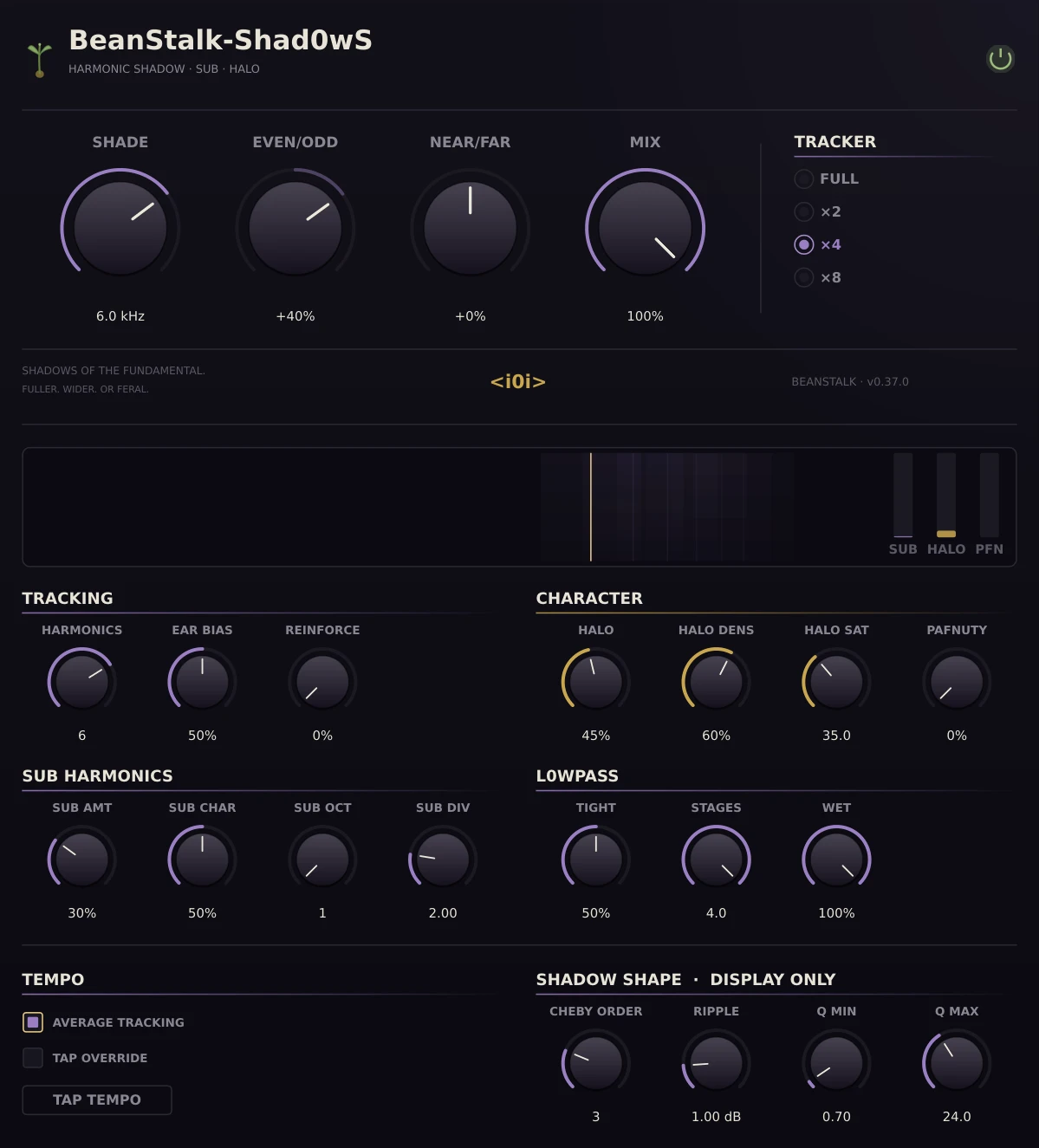
SHADE, EVEN/ODD, NEAR/FAR and MIX sit on the front, with the TRACKER selector beside them. Click the <i0i> mark in the footer for the drawer — a live view of the harmonic shadows plus every deeper control. Right-click it (it turns gold) for a hidden band with tempo-synced tracking. The whole panel scales as one piece.
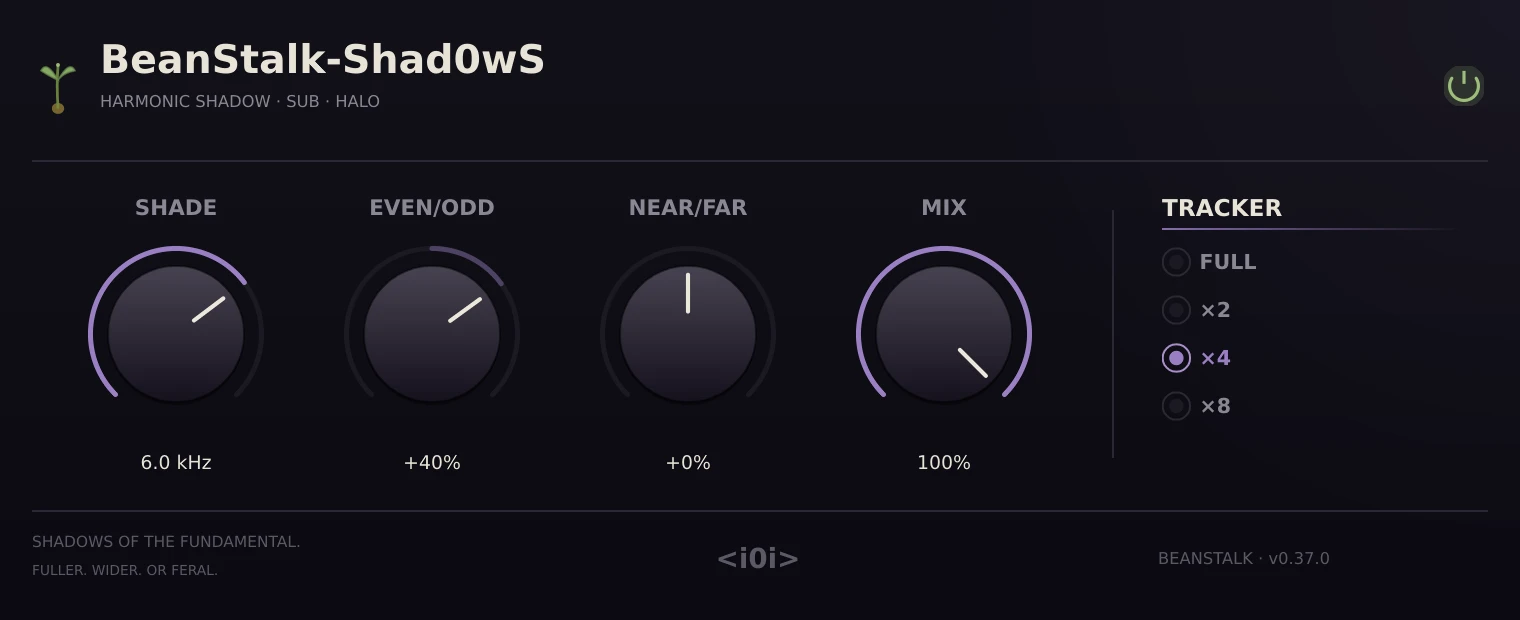
The BeanStalk-Shad0wS front panel: title 'BeanStalk-Shad0wS' with a bean-sprout mark and a green power light; four knobs labelled SHADE, EVEN/ODD, NEAR/FAR and MIX with value readouts; a TRACKER list with FULL, x2, x4 and x8; footer with taglines, a centred '<i0i>' mark and the version.
The front panel. Rendered from the real editor.
The same panel with the drawer and the hidden band open: a live shadow view with Sub, Halo and Pafnuty meters, then TRACKING, CHARACTER (gold arcs), SUB HARMONICS and L0WPASS, and below them TEMPO and SHADOW SHAPE. The <i0i> mark is gold.
Drawer and hidden band open. Screenshots are renders of the real editor with a synthetic 110 Hz test tone feeding the processor; parameter values are demo values.
Controls

What each one does.

SHADE20 Hz – 20 kHz, default openA low-pass on the shadow layer only. Your dry signal is untouched. Turn it down and the shadows go dark and soft.
EVEN/ODDbipolar, default centreUp boosts the even harmonics and cuts the odd ones; down does the opposite. The fundamental is never tilted.
NEAR/FARbipolar, default centreA ramp across the harmonic series: up favours harmonics nearest the fundamental, down favours the far ones.
MIX0 – 100 %, default 100 %Shadow against dry.
TRACKERFULL · ×2 · ×4 · ×8How often the five pitch trackers listen. Not a quality setting: each hears the pitch a little differently, so the shadow lands differently. Pick by ear.
TRACKINGdrawerHarmonics tracked (1–8), an ear-sensitivity bias that weights harmonics by how well we hear that frequency, and Reinforce, which tops up thin or missing harmonics toward a natural rolloff.
SUB HARMONICSdrawerAn octave-down layer: amount, character, octaves (1–3) and divisor.
CHARACTERdrawerThe gold HALO — an allpass diffusion edge with density and saturation — and PAFNUTY, a harmonic waveshaper.
L0WPASSdrawerThe engine behind SHADE: Tight, Stages and Wet.
TEMPOhidden bandAverage Tracking smooths the tracked pitch to a tempo-synced rate; Tap Tempo and Tap Override set that tempo by hand instead of using the host's.
SHADOW SHAPEhidden band · display onlyCheby Order, Ripple, Q Min and Q Max shape the bands drawn in the shadow view. The audio does not depend on them.
The bean-sprout marktop-leftClick to reveal every numeric readout. Dormant by default.
A few things to know before you download
What it isn't

Read this before you download.

No output limiterIt adds harmonic and sub material and can push well past 0 dBFS. Mind your levels.
Not a transparent enhancerIt is a character processor. Defaults are gentle; the drawer is where it gets feral.
One clear pitch at a timeTracking works best on a clear pitched source — bass, voice, synth, guitar. Dense full mixes give the trackers less to hold on to.
Mode switches aren't crossfadedChanging TRACKER while audio plays briefly clears the trackers' analysis window.
Technical details and verified specs
Technical

Verified specifications.

FormatsVST3 · Standalone application
Operating systemsWindows (64-bit) · Linux (64-bit)
Latency0 samples
TrackersFive bands, 125 Hz – 4 kHz, one tracker each
Output filtersFixed 20 Hz high-pass and 20 kHz low-pass, 10th-order Butterworth, always on
BypassThe power light is a true bypass — output equals input
ResizableOne uniform scale, 0.75× – 2×
BuildsTwo tiers per platform: a legacy build for any x86-64 CPU and a v3 build (VST3 + Standalone) for AVX2 CPUs
Signal Path

Five trackers, one shadow.

Shad0wS doesn't wait for one dominant pitch to lock in — five independently-tracked bands each get to cast their own harmonic shadow, simultaneously. The TRACKER selector sets how often those five trackers listen.

DRY, WEIGHTED BY (1 − CONFIDENCE) IN DRY 5-BAND HARMONIC ENGINE TRACK + RECONSTRUCT, CONF-SUMMED COMBINED HARM + SUB + PAFNUTY HALO MV2-STYLE ALLPASS EDGE CONF BLEND LOW CONF → MORE DRY AUTOGAIN LOUDNESS MATCH SUB LAYER OCTAVE DOWN PAFNUTY HARMONIC WAVESHAPER LOWPASS SMOOTHS WET BUS MIX DRY / WET SAFETY FILTERS INFRASONIC + ULTRASONIC OUT
5-Band Harmonic EngineFive fixed bandpass streams (125–250, 250–500, 500–1000, 1000–2000, 2000–4000Hz) each run their own fundamental tracker and their own Chebyshev harmonic reconstruction against the original dry sample — summed and confidence-normalized so multiple genuine partials contribute together.
Sub + PafnutyAn octave-down sub layer and a Pafnuty-style harmonic waveshaper both feed from the reconstructed signal itself, not the raw input — letting them react to what's already been tracked and shadowed rather than the untouched source.
Confidence BlendWhen tracking confidence is low, the wet bus doesn't go silent and wait — it smoothly folds in more of the real dry signal, so ambiguous or atonal passages still sound like something rather than a synthesized guess in a vacuum.
Fixed output filtersFixed Infrasonic and Ultrasonic filters sit on the final blended signal regardless of where Mix is set. They are not a limiter — Shad0wS has no output ceiling.

DSP Lineage & Attribution: This plugin incorporates adapted DSP components from Airwindows (Chris Johnson, MIT licensed): Infrasonic, Ultrasonic, Density3, Spiral2, Pafnuty2, DubSub, and the Butterworth stage design used by its Infrasonic/Ultrasonic filters. The specific components and applicable notices are documented in the third-party notices included with the release. This does not imply endorsement by or affiliation with Airwindows.

More BeanStalk plugins

See all plugins →